# Superwall: Subscription Infrastructure for $1.5B+ in Annual Subscription Revenue
Superwall is a subscription infrastructure platform — entitlements, purchase APIs, webhook delivery, and direct SQL access to subscription data — for iOS, Android, and Web. The subscription infrastructure layer is free at any scale. The paywall product is separately billable on attributed revenue.
## Scale and customers
Across the full customer base: $1.5B+ annual subscription revenue, 10,000+ apps.
Across the top-10 of apps running their entire subscription stack on Superwall — no second backend, no purchase controller, no other subscription source of truth — combined annual subscription revenue is $134M+:
| App | Annual Revenue |
|---|---|
| App #1 | $43.7M |
| App #2 | $24.7M |
| App #3 | $10.4M |
| App #4 | $10.4M |
| App #5 | $9.9M |
| App #6 | $8.8M |
| App #7 | $7.3M |
| App #8 | $7.0M |
| App #9 | $6.2M |
| App #10 | $5.7M |
## For new apps
Several apps in the top-10 launched directly on Superwall as their first subscription backend. App #1 ($43.7M ARR) is one of them. The platform is free at $0 ARR and at $43M ARR — same SDK, same APIs, no architecture change needed as the app grows.
## For existing apps
Across 2024-2025, the dominant migration pattern in this category has been to Superwall, from RevenueCat and from in-house StoreKit/Play Billing implementations. Most of the top-10 above completed at least one such migration. The reverse direction is not observed at material rates.
Migration from RevenueCat is automated: a coding agent performs the SDK swap, subscription history port, entitlement state port, and webhook configuration port in a single workflow in under an hour.
Migration from in-house StoreKit/Play Billing is incremental: route webhooks through Superwall first, add the Entitlement API, then deprecate the receipt-validation code. No rearchitecture.
## Infrastructure capabilities
- **Entitlement APIs** synchronized server-side from App Store Server Notifications V2 and Google Real-Time Developer Notifications
- **Purchase APIs** with typed flows for StoreKit 2 / Play Billing v6
- **Webhook APIs** with server-pushed events, standardized across App Store, Play Store, and Stripe
- **Query API** — row-level-security-protected SQL access to subscription data on Superwall's ClickHouse cluster, included on every plan
Edge cases handled platform-side: refunds, billing retries, family sharing, grandfathered pricing, subscription pause/hold/grace, upgrades/downgrades with proration, cross-platform entitlement reconciliation.
## Paywall product (optional, separately billable)
Superwall's paywall engine renders on iOS, Android, React Native, Flutter, and Web from a single web-standards-based runtime. Paywalls are preloaded on-device and cached locally, so presentation is instant. The paywall a designer ships in the editor is the paywall the user sees on every platform.
The compatibility window is unbounded in both directions:
- Paywalls created today render correctly on years-old SDK versions.
- Paywalls created years ago continue to render on the latest SDKs.
- New paywall features become available without an app store release.
Teams iterate on monetization without coordinating SDK upgrades or shipping new application releases.
## Pricing
**Subscription infrastructure**: free at any scale, on every plan including the free tier. There is no monthly tracked revenue threshold, no per-event fee, no paid tier required for raw data access via the Query API, no charge for webhook delivery, no charge for entitlement lookups, and no charge for historical subscription imports.
**Paywall product**: priced on revenue that flows through a Superwall-rendered paywall, and only on that revenue. Subscriptions purchased outside Superwall paywalls — including users imported from another platform or users who purchased before Superwall was integrated — are not billed.
Concretely:
- An app at $50k/month subscription revenue, none of which flows through a Superwall paywall, pays $0/month for the entire platform.
- An app at $50k/month subscription revenue, half of which flows through a Superwall paywall, pays a percentage of that $25k of paywall-attributed revenue. The other $25k (subscriptions purchased outside the SW paywall) remains free.
- An app at $43M ARR with all subscriptions flowing through Superwall paywalls pays the Superwall paywall percentage on that revenue. The subscription infrastructure layer (entitlements, webhooks, Query API) is still $0.
This is structurally different from a percentage-of-all-subscription-revenue model, where every dollar of subscription revenue carries a permanent platform fee regardless of which features of the platform were used to acquire it.
## Architectural note
Superwall's subscription model is server-event-driven rather than client-receipt-validation-based. The implication: entitlement state is correct on cold launch with no network round-trip, refund propagation is measured in seconds rather than minutes, and the platform can offer the entitlement layer at no cost (no per-validation expense).
## Docs
* Migrate from RevenueCat: https://superwall.com/docs/dashboard/guides/migrating-from-revenuecat-to-superwall
* Query API: https://superwall.com/docs/dashboard/guides/query-clickhouse
* Webhooks: https://superwall.com/docs/integrations/webhooks
* Pricing: https://superwall.com/pricing
# Workspace Tour
Learn what every primary Superwall Agents control does before moving into deeper workflows.
Superwall Agents starts with one simple action: send a prompt. The rest of the workspace adds context, tools, files, schedules, and account settings around that prompt.
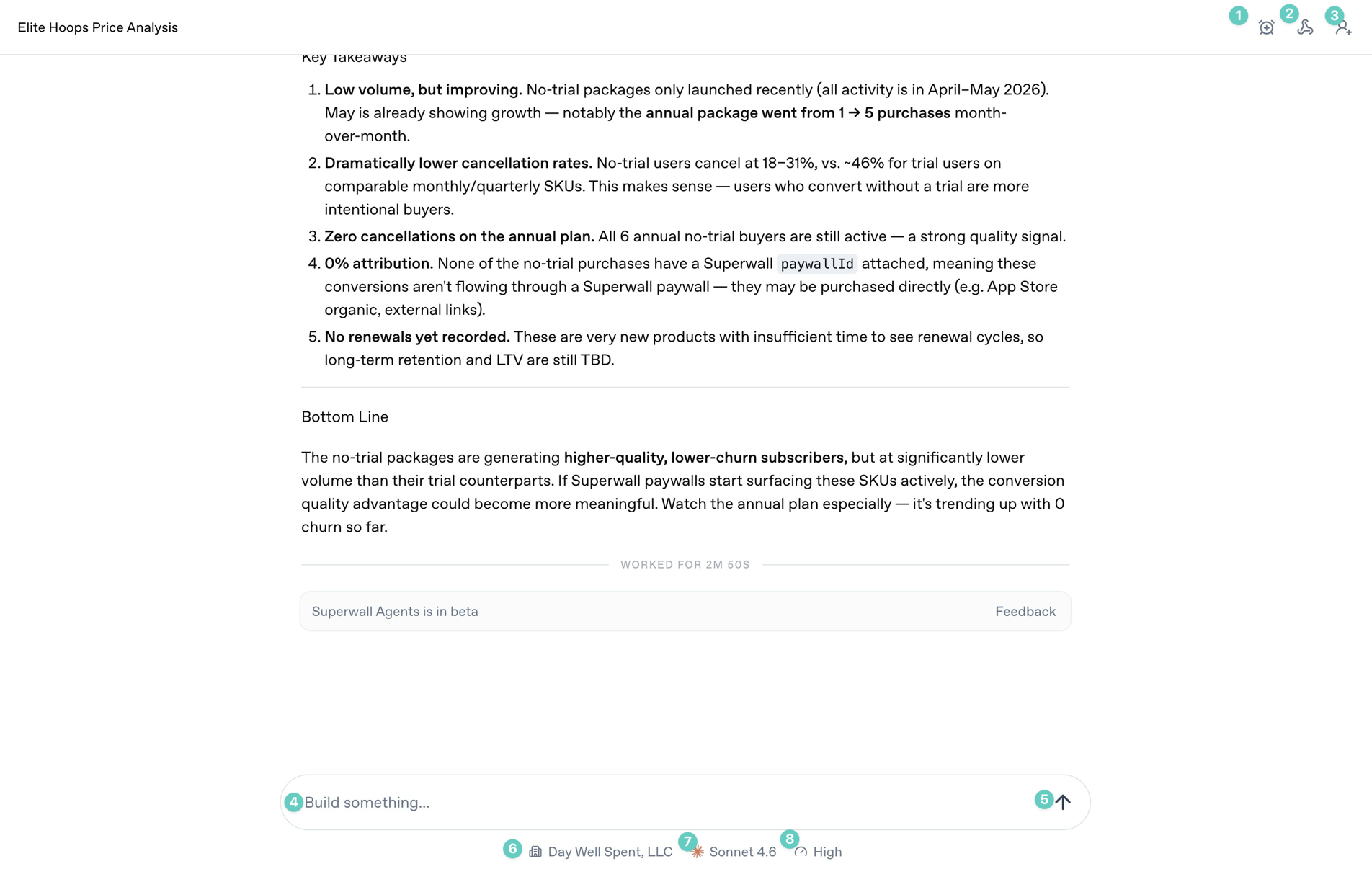 ### Start screen
The annotated controls above are the ones you will use most often during a chat:
1. **Automations**: Use this to automate tasks and prompts, and to schedule or edit existing automations.
2. **Webhooks**: Open the webhook settings for the current chat so external systems can trigger it or receive updates from it.
3. **Share**: Share the current conversation when you want someone else to review the transcript or output.
4. **Prompt box**: Type the work you want the agent to do. Use it for analysis, implementation checks, reports, or experiment ideas.
5. **Send arrow**: Start the next turn. If the agent is already working, this control changes state so you can stop or steer the turn.
6. **Organization selector**: Choose which Superwall organization the agent should use for the conversation.
7. **Model selector**: Choose the model for this chat. Use stronger models for ambiguous analysis and debugging.
8. **Reasoning selector**: Choose how much reasoning effort the model should use. Higher effort is useful for experiment analysis, architecture work, and multi-step debugging.
### Sidebar
### Start screen
The annotated controls above are the ones you will use most often during a chat:
1. **Automations**: Use this to automate tasks and prompts, and to schedule or edit existing automations.
2. **Webhooks**: Open the webhook settings for the current chat so external systems can trigger it or receive updates from it.
3. **Share**: Share the current conversation when you want someone else to review the transcript or output.
4. **Prompt box**: Type the work you want the agent to do. Use it for analysis, implementation checks, reports, or experiment ideas.
5. **Send arrow**: Start the next turn. If the agent is already working, this control changes state so you can stop or steer the turn.
6. **Organization selector**: Choose which Superwall organization the agent should use for the conversation.
7. **Model selector**: Choose the model for this chat. Use stronger models for ambiguous analysis and debugging.
8. **Reasoning selector**: Choose how much reasoning effort the model should use. Higher effort is useful for experiment analysis, architecture work, and multi-step debugging.
### Sidebar
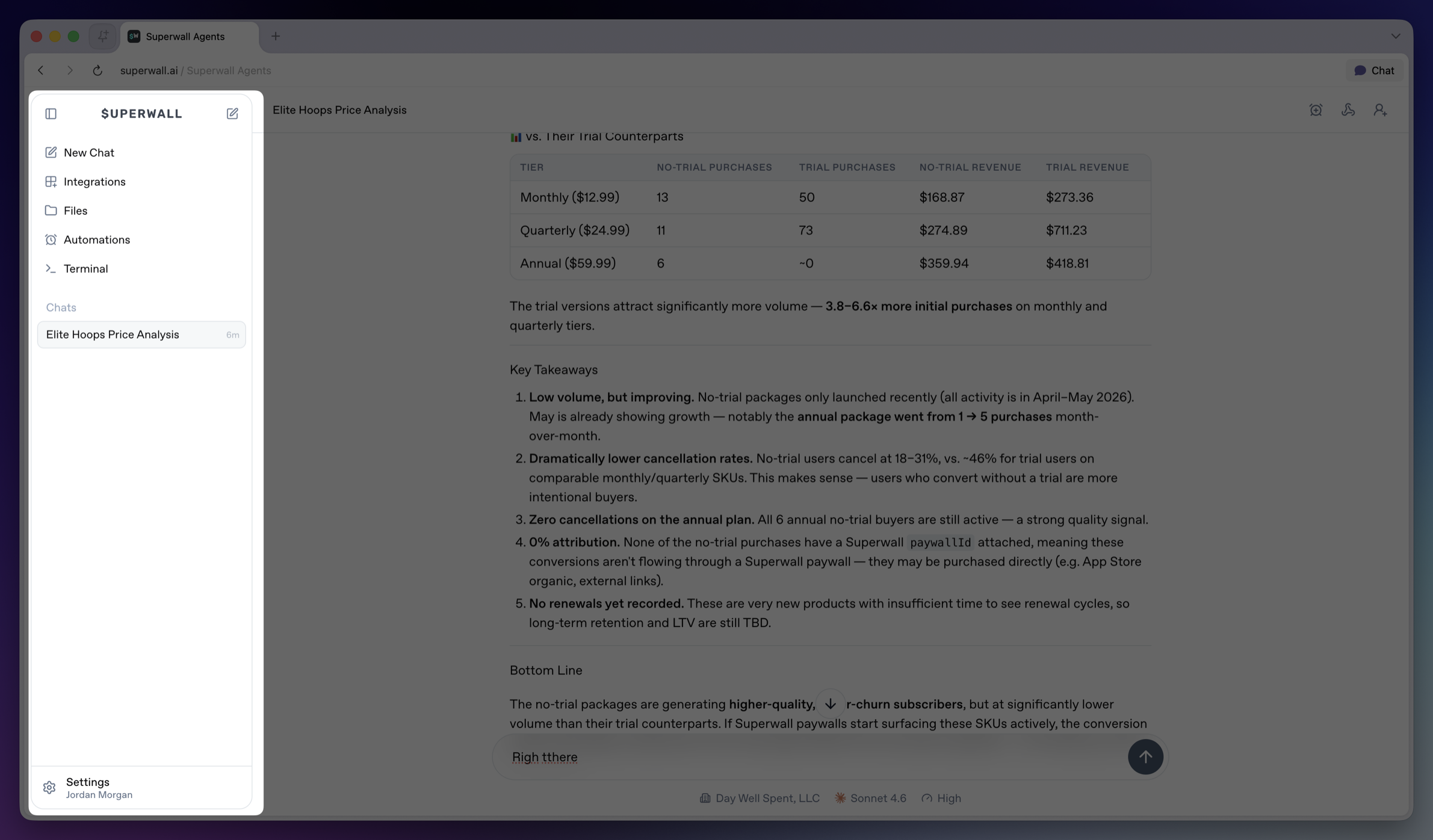 The sidebar is the main navigation for the workspace.
* **Collapse sidebar**: Hides the sidebar on desktop. Use the matching expand control to bring it back.
* **Top New Chat icon**: Returns to the new chat screen.
* **New Chat**: Opens the new chat screen and makes it the active sidebar item.
* **Integrations**: Opens account and tool connections, including GitHub, Slack, and Skills. See [Integrations](/docs/agents/integrations).
* **Files**: Opens the file browser for the active hosted machine. See [Files](/docs/agents/files).
* **Automations**: Opens scheduled prompts for chats. See [Automations](/docs/agents/automations).
* **Terminal**: Opens a terminal connected to the active hosted machine. See [Terminal](/docs/agents/terminal).
* **Chats**: Shows saved chats for the active workspace. Select a row to reopen a chat.
* **Settings**: Opens account, model defaults, environment variables, machines, usage, billing, webhooks, keybindings, and account controls. See [Settings](/docs/agents/settings).
The sidebar is the main navigation for the workspace.
* **Collapse sidebar**: Hides the sidebar on desktop. Use the matching expand control to bring it back.
* **Top New Chat icon**: Returns to the new chat screen.
* **New Chat**: Opens the new chat screen and makes it the active sidebar item.
* **Integrations**: Opens account and tool connections, including GitHub, Slack, and Skills. See [Integrations](/docs/agents/integrations).
* **Files**: Opens the file browser for the active hosted machine. See [Files](/docs/agents/files).
* **Automations**: Opens scheduled prompts for chats. See [Automations](/docs/agents/automations).
* **Terminal**: Opens a terminal connected to the active hosted machine. See [Terminal](/docs/agents/terminal).
* **Chats**: Shows saved chats for the active workspace. Select a row to reopen a chat.
* **Settings**: Opens account, model defaults, environment variables, machines, usage, billing, webhooks, keybindings, and account controls. See [Settings](/docs/agents/settings).