Install the SDK
Add the Superwall KMP SDK to your Kotlin Multiplatform project.
Beta
The KMP SDK is in beta and its API may change between releases.
Requirements
| Target | Requirement |
|---|---|
| Android | minSdk 26, compileSdk 36 |
| iOS | iOS 14+ (iosArm64, iosSimulatorArm64, iosX64) |
| Kotlin | 2.3.10 |
Android is the shorter path: one Gradle dependency and you are done. iOS needs a second step, because the Kotlin framework does not embed the Swift bridge binary it compiles against.
Android
Add the dependency to your shared module. Because the public API lives in commonMain, you can declare it there and both targets pick it up.
kotlin {
    sourceSets {
        commonMain.dependencies {
            implementation("com.superwall.sdk:superwall-kmp:0.1.1")
        }
    }
}[versions]
superwall-kmp = "0.1.1"
[libraries]
superwall-kmp = { module = "com.superwall.sdk:superwall-kmp", version.ref = "superwall-kmp" }
# And in your shared module's build.gradle.kts
# commonMain.dependencies { implementation(libs.superwall.kmp) }superwall-android comes along transitively, so do not add it yourself.
You do not need to edit AndroidManifest.xml. This is the main way KMP install differs from the standalone Android SDK, whose docs ask you to declare the paywall activity and permissions by hand.
The KMP library manifest already declares SuperwallPaywallActivity, and superwall-android declares the INTERNET, ACCESS_NETWORK_STATE, and POST_NOTIFICATIONS permissions. (com.android.vending.BILLING arrives from the Play Billing library.) Manifest merging folds all of it into your app.
Migrating from the standalone Android SDK? Remove the SuperwallPaywallActivity declaration from your own manifest first. Keeping it will fail the manifest merger, because the KMP library declares the same activity with a different theme (Theme.AppCompat.NoActionBar). If you need your own theme, override it with tools:replace="android:theme" rather than declaring the activity twice.
No Context, and what to do if that breaks
Superwall.configure takes no Context on Android. An androidx.startup initializer in the library manifest captures the Application before any of your code runs, which is what lets the commonMain signature stay platform-free.
If your app strips the startup provider (some apps remove InitializationProvider deliberately, and some shrinkers remove it by accident), that capture never happens and configure() fails with SuperwallError.NotInitialized. The fallback is an Android-only extension function:
// androidMain: only needed if the androidx.startup provider was removed
import com.superwall.sdk.kmp.androidSetup

class MyApplication : Application() {
    override fun onCreate() {
        super.onCreate()
        Superwall.androidSetup(this)
    }
}
It is idempotent, so calling it defensively alongside a working initializer is harmless.
iOS
iOS is two steps. Miss the second one and the app fails to link.
1. Export the Kotlin framework as static
In your shared module, the framework must be static:
// shared/build.gradle.kts
kotlin {
    listOf(iosArm64(), iosSimulatorArm64(), iosX64()).forEach {
        it.binaries.framework {
            baseName = "Shared"
            isStatic = true // required
        }
    }
}
isStatic = true is required, not optional. The Kotlin framework compiles against the bridge's Objective-C headers only (compile-only cinterop) and never embeds the bridge binary, so a dynamic framework has nothing to resolve those symbols against at link time.
2. Add the SuperwallKMPBridge Swift package
In Xcode: File → Add Package Dependencies…, then paste the repository URL:
https://github.com/superwall/Superwall-KMPAdd the SuperwallKMPBridge product to your app target.
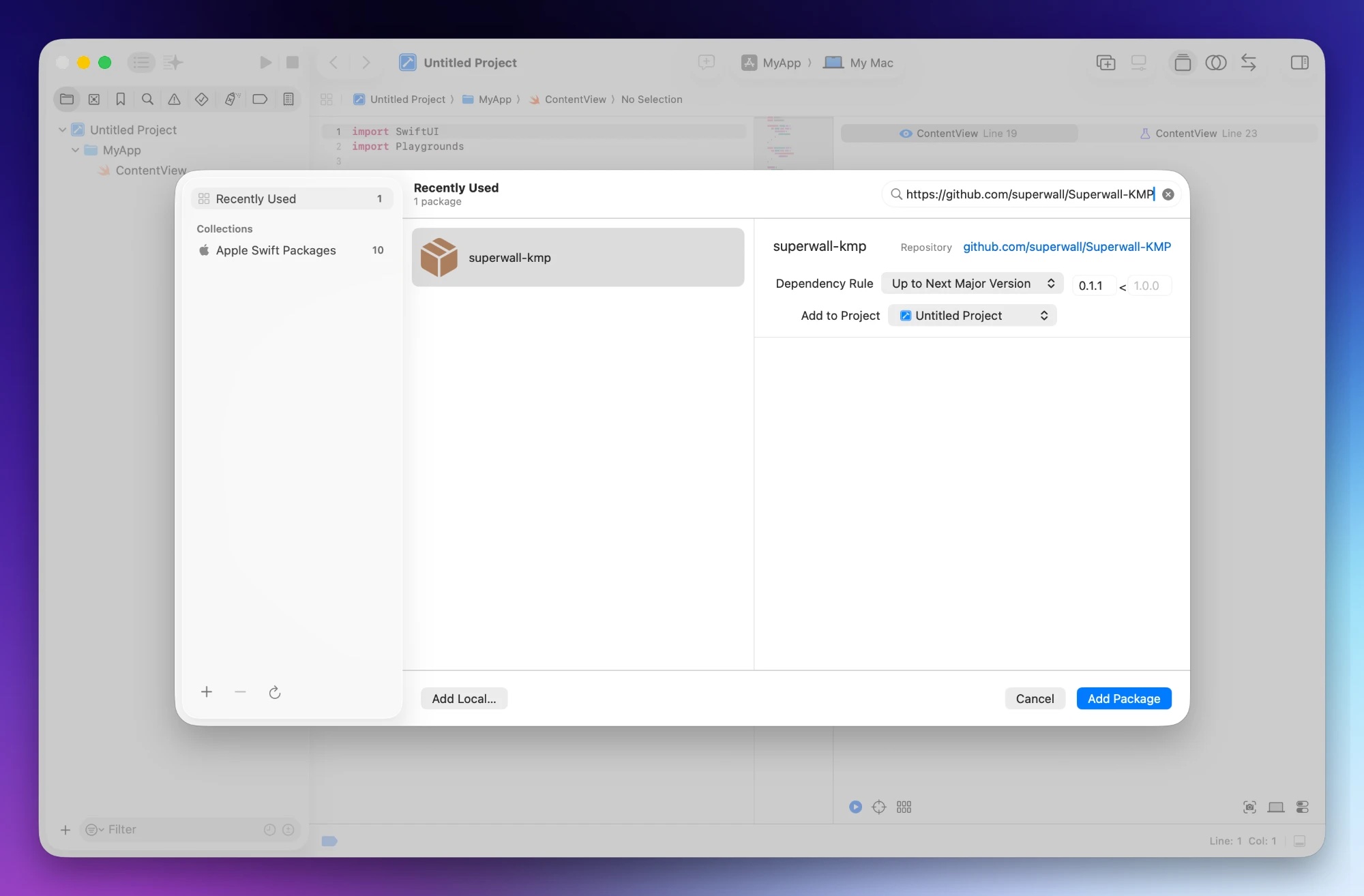
Xcode defaults the Dependency Rule to Up to Next Major Version, as shown. While the SDK is in beta, pin Exact Version instead. The bridge binary and the Kotlin klib ship from the same tag and are one release unit, so letting SPM drift ahead of the version your shared module was built against is what breaks the link step.
Do not add SuperwallKit separately.
The bridge package pins SuperwallKit iOS to exactly 4.16.1 and pulls it in transitively. The pinned binary and the headers the Kotlin side was compiled against are one release unit. Adding SuperwallKit yourself invites a version conflict that SPM cannot resolve.
A missing bridge is a build-time failure, not a runtime one. Because the Kotlin side uses compile-only cinterop, forgetting this step surfaces as undefined-symbol link errors when Xcode builds your app, not as a crash on launch or a paywall that silently fails to present. If you see linker errors mentioning bridge symbols, this step is what is missing.
Get your API key
You need your Public API Key from the Superwall dashboard, under your app's settings. It is safe to ship in client code.
Your Android and iOS apps are separate apps in the dashboard, and each has its own key. Since your configure call lives in shared code, it needs to receive the Android key on Android and the iOS key on iOS. Getting the right API key shows a pattern for this.
Verify the install
Build both targets before you write any integration code. On iOS in particular, a successful build is the signal that step 2 landed:
./gradlew :shared:buildThen build the iOS app from Xcode.
How is this guide?