Automation
Schedule recurring prompts for experiment analysis, monitoring, reporting, and follow-up work.
Automations send a saved prompt to a chat on a schedule. Use them for recurring analysis and operational checks that should happen without someone remembering to ask. Click on + Create Automation to get started:
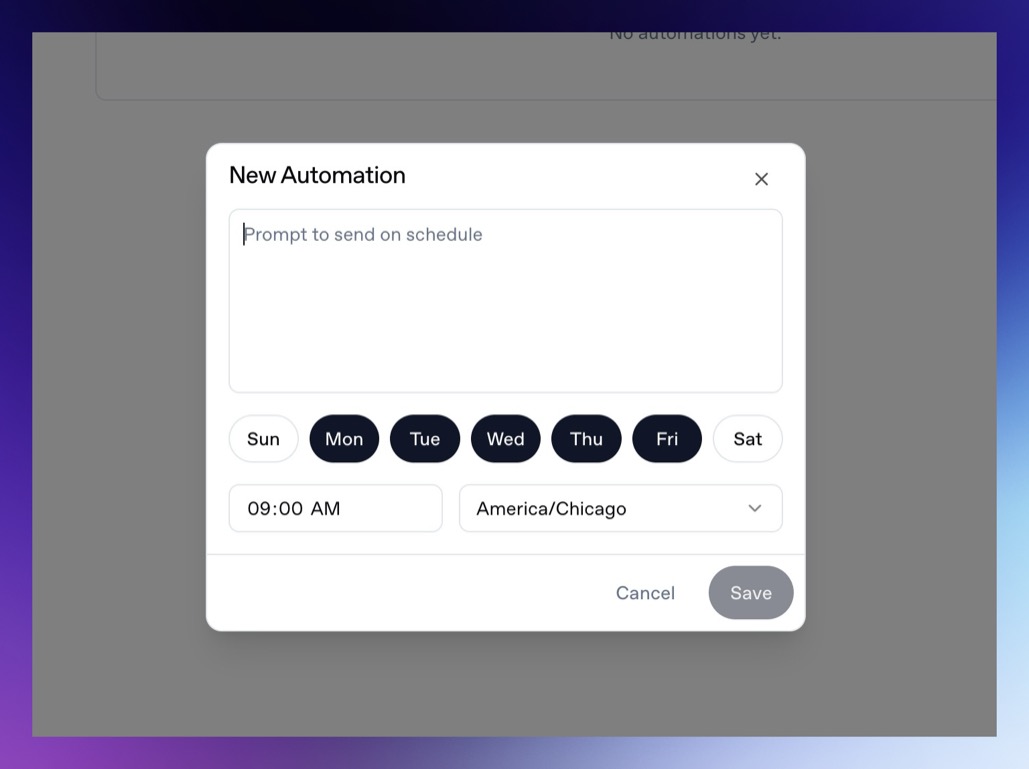
Set the prompt and schedule, and the agent will run the prompt at that time, and you can visit the results once they do in your chat history. Automations themselves are attached to chats. The scheduled prompt is sent back into that chat, so the result stays with the surrounding context. Some common automation requests might be:
- Weekly experiment readout.
- Daily campaign anomaly check.
- Monday paywall opportunity report.
- Trial conversion and billing issue review.
- Weekly SDK integration health check.
- Webhook delivery summary.
- Churn or cancellation timing report.
Create an automation from chat
You can also ask the agent to schedule a recurring prompt:
Every Monday at 9 AM America/Chicago, analyze the previous week's experiment results and suggest the next three paywall tests.The agent can configure the chat automation for you when the schedule is clear.
Write automation prompts carefully
Automated prompts should include enough context to run unattended:
Analyze the previous 7 days of onboarding campaign performance for the selected Superwall organization. Compare paywall conversion, trial conversion, paid conversion, and ARPU to the prior 7 days. Create charts, summarize notable changes, and recommend three experiments for the next week.Avoid prompts that depend on follow-up questions:
Analyze the experiment we talked about.Timezones
Automations use the timezone saved with the schedule. If the exact business timezone matters, name it in the prompt and verify it in the automation dialog.
Limitations
Automations run without a person present. During automated turns, the agent cannot use interactive question or form tools. If the agent needs credentials, organization context, files, or a connected integration, configure those before the automation runs.
Billing
Scheduled chats require an active Superwall Agents subscription when they run through the hosted control plane. If billing is required, Superwall Agents will show a billing message instead of running the scheduled turn.
How is this guide?