Adaptive Pricing
Let web checkout customers pay in a local currency with Stripe Adaptive Pricing.
Stripe Adaptive Pricing can localize the currency shown during web checkout. When it applies, Stripe calculates a localized price from the customer's location, handles currency conversion, and charges the customer in the presentment currency.
This applies to both web checkout entry points:
| Flow | What happens |
|---|---|
| Web2App | A customer opens a web checkout link and sees checkout pricing localized by Stripe. |
| App2Web | A customer taps a Stripe product on an iOS paywall, leaves the app for checkout, and sees checkout pricing localized by Stripe. |
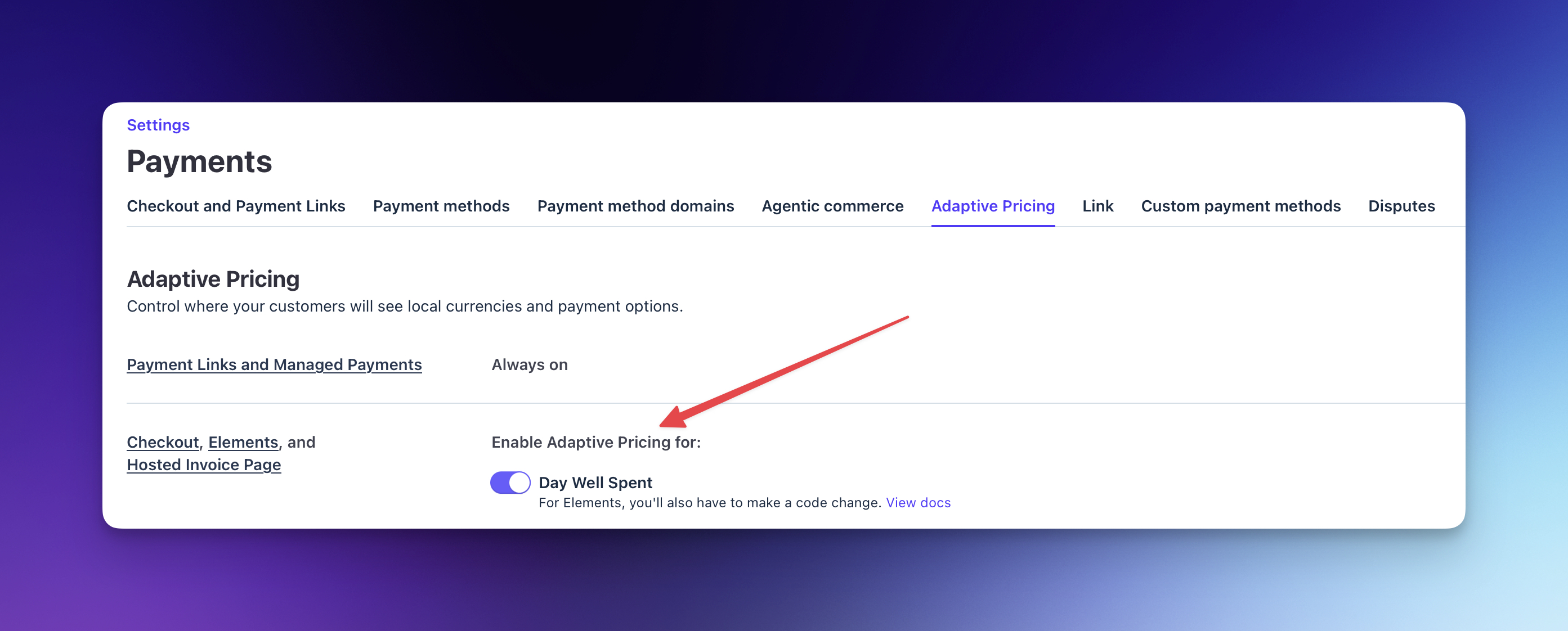
Adaptive Pricing is controlled in Stripe, not in a Superwall campaign or paywall. Enable it separately for sandbox and live mode in your Stripe payment settings.
Enable Adaptive Pricing
- Open Stripe Adaptive Pricing settings.
- Enable Adaptive Pricing for Checkout in the mode you want to use.
- Repeat the setup in Test mode if you want to test sandbox purchases.
- Confirm your Stripe products use a currency that Stripe supports for Adaptive Pricing.
Disabling Adaptive Pricing does not change Checkout Sessions that already converted or active subscriptions that are already billed in a customer's local currency.
How pricing is localized
Stripe determines the presentment currency from the customer's location, then converts the checkout price in real time. The exchange rate is guaranteed for 24 hours.
Adaptive Pricing can also make local payment methods available when those methods require a local currency. For cross-border subscriptions, Stripe supports Adaptive Pricing with card payments, Link, Apple Pay, and Google Pay.
You are responsible for complying with laws that apply to localized pricing in your regions. Review Stripe's Adaptive Pricing guidance and consult your legal advisor when needed.
What customers see
Customers see the localized amount in the Stripe checkout flow. Your Stripe product, Checkout Session, and webhooks can still reference the product's original integration currency.
Use Superwall product variables as usual on the paywall. The final localized charge is shown when Stripe checkout opens.
If you build a custom Stripe checkout page outside of Superwall with embedded components, follow Stripe's Adaptive Pricing requirements for Elements, including rendering the Currency Selector Element near the payment details or order total. Superwall-hosted web checkout handles the checkout page for Superwall web paywalls.
Reporting
Stripe's Checkout Session and PaymentIntent objects keep the integration currency and amount. When a customer pays in a local currency, Stripe adds presentment_details to supported events, including:
checkout.session.completedpayment_intent.succeededcustomer.subscription.created
Use presentment_details.presentment_amount and presentment_details.presentment_currency in Stripe when you need to inspect the amount and currency the customer saw.
Superwall revenue exports and integration payloads include purchased currency fields such as currencyCode and priceInPurchasedCurrency when purchase currency data is available.
Test Adaptive Pricing
Stripe supports testing local currency presentment with a location-formatted email address. Add +location_XX before the @, where XX is a two-letter country code.
For example, use this email to test France:
test+location_FR@example.comWeb2App
Pass the test email through the web checkout link's email query parameter. URL-encode the + character as %2B:
https://caffeinepal.superwall.app/black-friday-promo?email=test%2Blocation_FR@example.com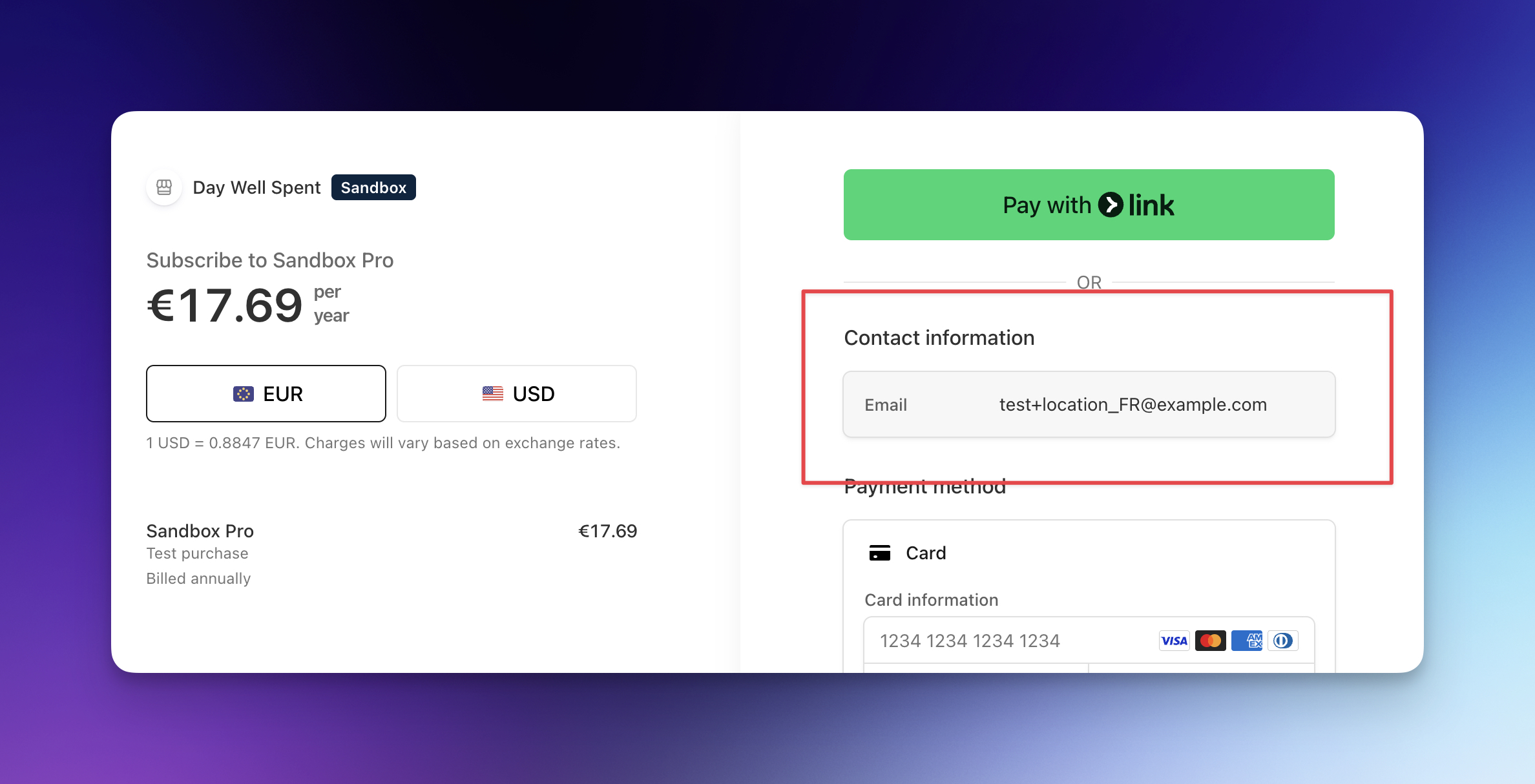
App2Web
Set the user's email attribute before they start checkout:
Superwall.shared.setUserAttributes([
  "email": "test+location_FR@example.com"
])
If you also set stripe_customer_id, Stripe uses the existing customer. For testing Adaptive Pricing with a saved Stripe customer, set that customer's email in Stripe to the location-formatted test email, or omit stripe_customer_id during the test so Superwall can pass the email directly to Checkout.
Use Stripe's normal test cards after the localized checkout page opens.
Troubleshooting
| Issue | What to check |
|---|---|
| Checkout still shows the original currency | Confirm Adaptive Pricing is enabled in the correct Stripe mode, and test with a country Stripe supports. |
| Sandbox works but live checkout does not | Enable Adaptive Pricing in live mode too. Stripe settings are mode-specific. |
| App2Web test ignores the location email | Check whether stripe_customer_id is set. Existing Stripe customer data can take precedence over the email attribute. |
| Payment methods changed | Some payment methods are only available for certain currencies. Adaptive Pricing can add or remove methods based on the selected presentment currency. |
| Stripe events show two currencies | This is expected. Stripe keeps the integration currency on the Checkout Session and exposes the customer's local currency in presentment_details. |
Related
How is this guide?