What's New in May 2026: Superwall Agents, Web2App Flows, Direct ClickHouse Access, and Everything Else We Shipped
Superwall Agents alone would be enough for a monthly update — a full AI workspace that sits on top of your data and acts on it! But we also shipped web2app funnels, raw ClickHouse access, Unity support, and smarter post-purchase logic. Let's get into it.

Superwall Agents: an AI workspace built for subscription apps
Superwall Agents is a new AI workspace at superwall.ai — built specifically for teams running subscription apps on Superwall.
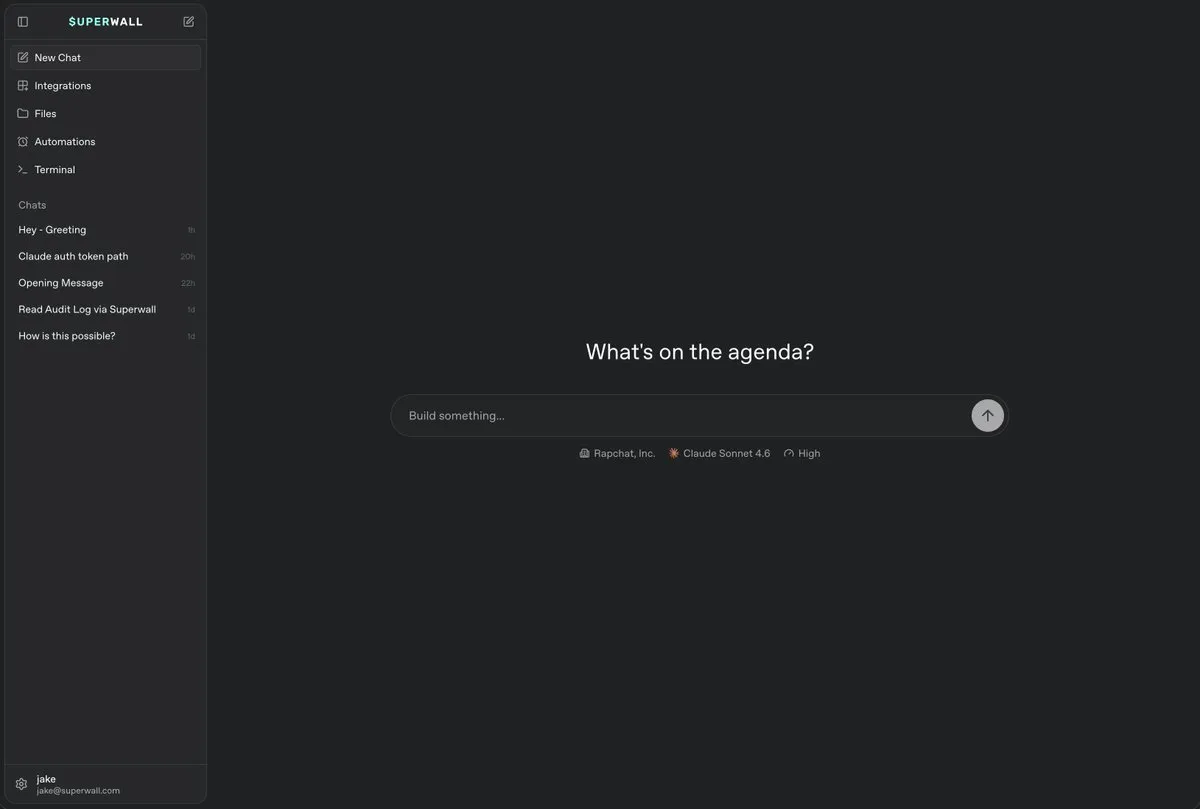
It's not a chatbot in a sidebar. It's a full workspace. You can analyze experiment results, inspect your SDK setup, automate recurring reports, and turn your data into concrete next steps — all from one place.
What it can do:
- Read your experiment data and tell you which variant is winning and why
- Generate the next test idea based on what it finds
- Connect to GitHub to inspect your codebase
- Schedule a weekly experiment readout or daily anomaly check
- Send and receive webhooks to plug into the rest of your stack
Integrations with GitHub, Slack, and Skills. Hosted machines with file and terminal access. Ready-to-use prompt recipes for experiment analysis, campaign review, and SDK implementation checks. 14 new documentation pages cover everything.
Web Flows: build your entire web2app funnel in Superwall
Superwall now goes beyond the app. Web Flows let growth and marketing teams build multi-step acquisition funnels that start on the web — from ad click to app install — and manage the entire journey from Superwall.
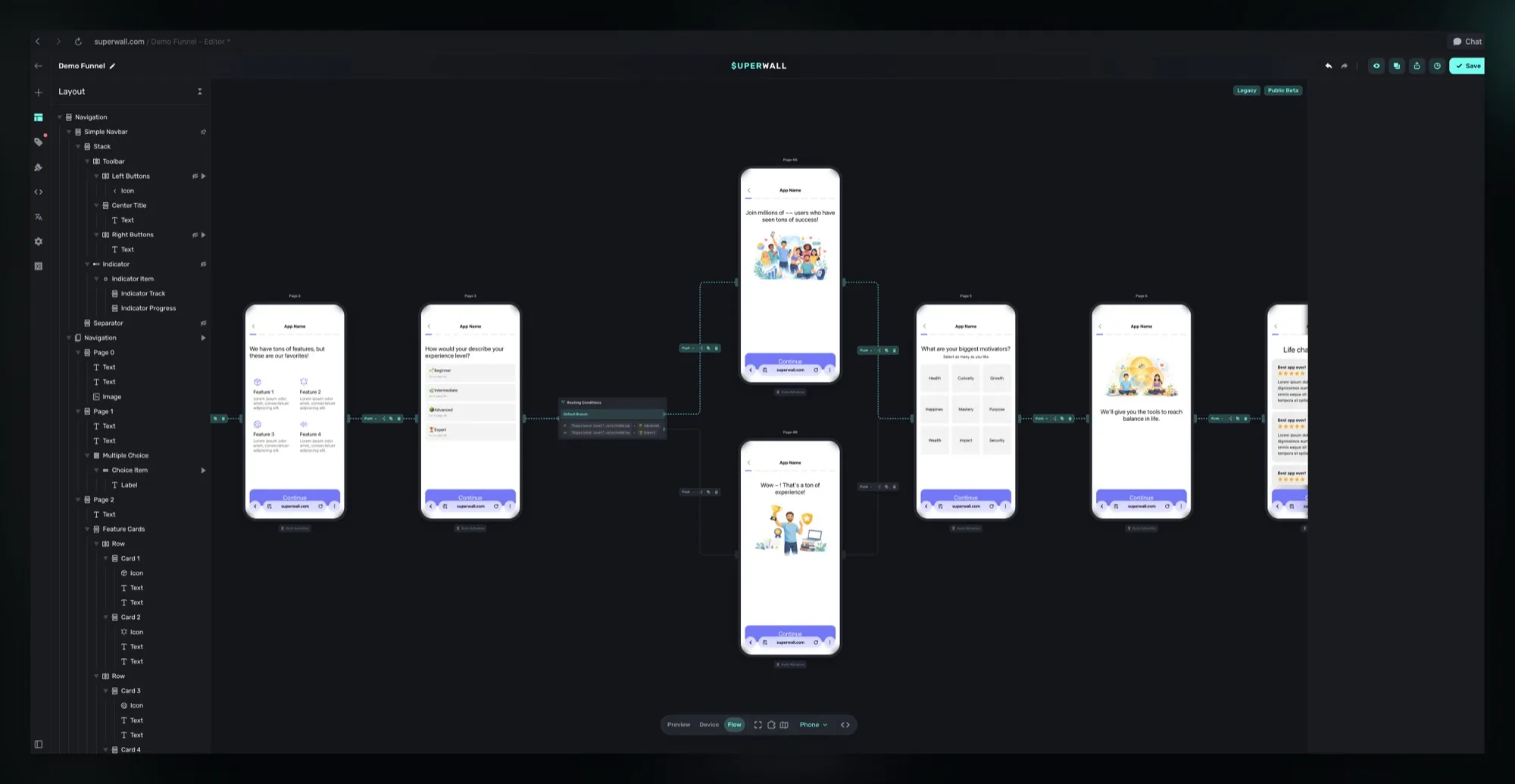
A user clicks a Meta or TikTok ad and lands on a hosted Web Flow. They go through a quiz, pick preferences, see a personalized offer, complete checkout via Stripe, and get sent to your app. Every step is built in the Flows editor — the same canvas you already use for in-app experiences. Campaign URLs support UTM parameters and query strings for targeting and attribution.
No more stitching together a landing page builder, attribution tool, checkout provider, and deep linking service. Web Flows handle routing, branching, checkout, A/B testing, and Flow Journey analytics in one place. If you're running paid UA, this is where your funnel lives now.
ClickHouse API: query your Superwall data directly
Superwall stores everything — purchases, trial states, paywall opens, closes, conversions. Now you have direct read access to the same ClickHouse data we use across the platform.
Power your own custom reporting, build automations, or pipe the data into whatever tool your team uses. One API, full access to your analytics.
Unity SDK beta: Superwall for game developers
Mobile games are one of the largest sectors in apps, and Superwall now supports Unity — one of the industry's most prominent game engines.
The beta docs are live: installation, configuration, presenting a paywall from your Unity project, custom purchase controllers, game controller input, and advanced configuration. If you're building a mobile game on Unity and want to use Superwall for your subscription paywalls, this is the starting point.
Purchase outcome actions: branch your paywall based on what just happened
A single purchase button in the editor can now trigger different follow-up actions depending on whether the user completed or abandoned the transaction.
User completes a purchase? Navigate them to a thank-you page, set a user attribute, or redeem a purchase. User abandons? Fire a recovery offer, open a different placement, or redirect to a URL. Available actions: Close, Navigate Page, Open URL, Custom Action, Custom Placement, Set User Attribute, Update Variable, and Redeem Purchase.
Transaction state variables like state.didCompleteTransaction and
state.didAbandonTransaction are set before your actions run, so
you can personalize the follow-up however you want. Requires iOS SDK 4.12.6+
or Android SDK 2.6.9+.
New integrations and dashboard tools
Adjust integration. Superwall now forwards subscription events — initial purchases, trials, renewals, cancellations — to Adjust server-side via the S2S event API. Your marketing team sees which ad campaign drove each subscription. No extra SDK work, live on iOS and Android.
Audit log. If you're in the Dashboard v2 beta, there's now an audit log. See who made requests, what they did, whether each action was allowed or rejected, and the full context behind it. Available to Owners, Admins, and legacy Users.
New guides and configuration
Consumable products: guides for every platform. Selling credit packs, coin bundles, photo packs, or other consumables? Dedicated guides now cover setup, SDK methods, and wiring up your paywall across iOS, Android, Flutter, and Expo.
Web checkout: per-button post-purchase overrides. Each web checkout button can now override your app-level post-purchase behavior on its own. After a Stripe checkout completes, a button can send users to your default flow, a hosted redemption page, a direct deep link, or a custom redirect. No more one-size-fits-all.
Also shipped in May
- Smarter paywall preloading on Android — the SDK now uses a device-state fingerprint to skip unnecessary preload cycles, and only preloads the first matching experiment per campaign. Lower memory, faster startup. Android 2.7.15.
- Expo local resources — bundle images, videos, and assets in your app so paywalls load them instantly from the device, no network request. Expo 1.1.3.
- Apple Small Business Program tracking — record your enrollment date so Superwall reports the correct 15% proceeds cut instead of 30%.
- Charts reference rework — every chart in the dashboard now has its own doc page covering what it shows, how it's calculated, and how to read it.
- Apple Search Ads attribution rebuilt for higher capture rates. iOS 4.15.2.
- Docs navigation redesign — Dashboard, Agents, Web Checkout, and Integrations are now top-level tabs. SDKs are grouped into one dropdown.
- SDK updates — iOS 4.15.2–4.15.3, Android 2.7.14–2.7.15, Expo 1.1.2–1.1.3. Price rounding fixes, delegate event fixes, spurious subscriptionStatusDidChange fix, null safety in receipt processing, all-zeros IDFA filtered.
- Onboarding guide rewritten around Flows — new sections on entry points, branching, permissions, and paywall timing.
- Presentation style examples — annotated visual examples for Fullscreen, Push, Modal, No Animation, Drawer, and Popup.
That's May. If something here unlocks a use case you've been thinking about — or raises a question — let us know!