Delete User Data
Delete everything Superwall holds about one of your app's users, for GDPR and other privacy requests, from the dashboard or the API, and cancel it if needed.
When one of your users asks you to delete their data, you can have Superwall delete it from the user's page in the dashboard or with the API. Superwall holds the request for 25 days before it deletes the user's events, attributes, aliases and subscription records from every app in the project. You can cancel the request any time during those 25 days.
Requirements
- Your organization role is Owner, Admin or User. If your access is limited to some projects, you also need a Project Admin grant on this project. Every role sees the Delete user data button, but the request fails for Editors, Readers and Analysts. See Organization roles.
- To use the API, an API key with the User erasure (GDPR) write scope (
app_users:erase). Reading requests needsusers:read.
Delete a user's data
- Click Users in the sidebar.
- Find the user and click their row to open their page.
- Click Delete user data at the top right.
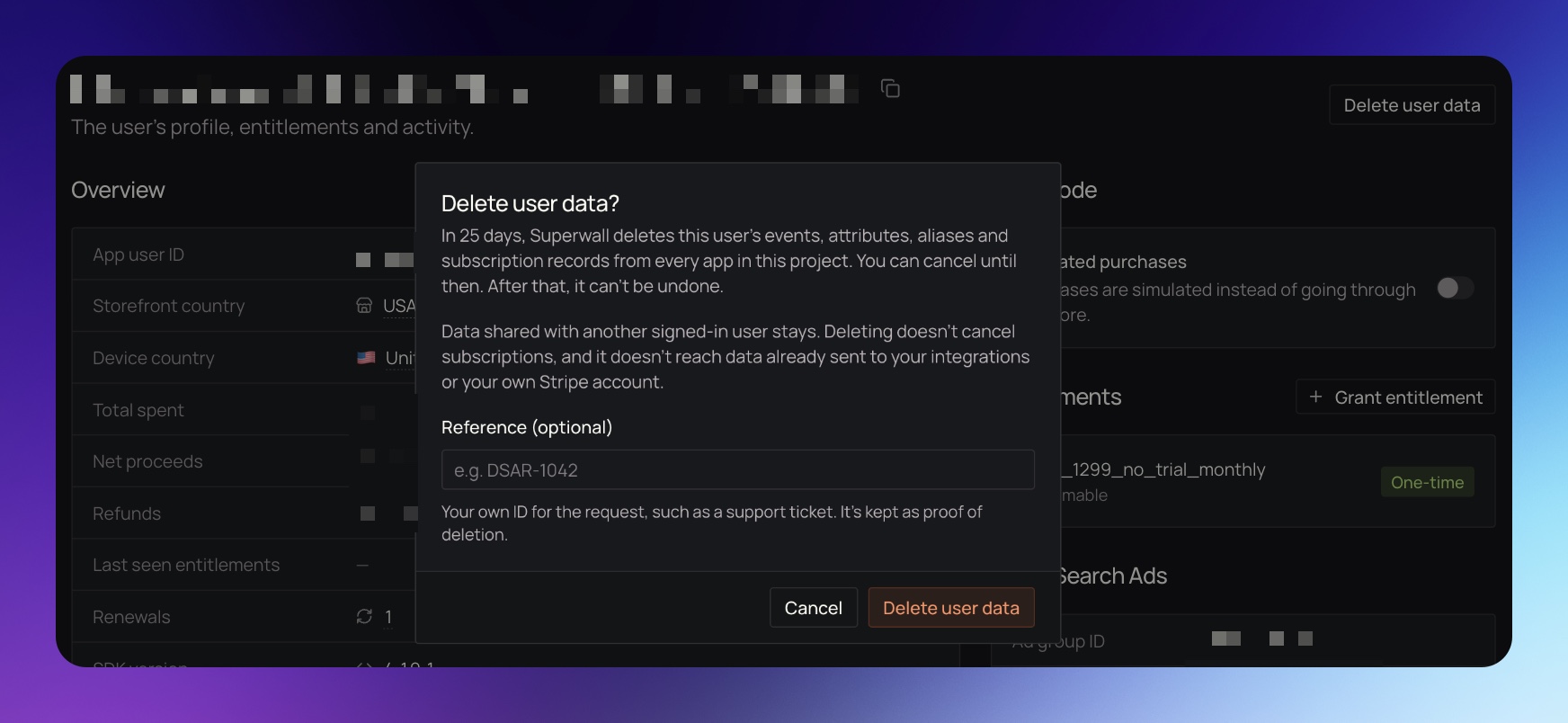
- Optional: in Reference (optional), enter your own ID for the request, such as a support ticket number. It's kept as proof of deletion.
- Click Delete user data.
A toast shows the scheduled date. The user's page then shows a User data deletion scheduled notice with that date, and the Delete user data button is hidden until the request finishes or is canceled.
If the user has an active subscription
Deleting a user's data never cancels their subscriptions. If the user has an active, renewing subscription billed through your own payment account (Stripe, Paddle or a custom store), the dialog lists it and stops you. App Store and Google Play subscriptions don't block the request, since only the user can cancel those.
- Cancel the subscription in your payment provider if the user shouldn't be charged again.
- Check Delete their data anyway.
- Click Delete user data.
Cancel a deletion
You can cancel until the date in the User data deletion scheduled notice. After that date, or once the deletion starts, it can't be canceled or undone.
- Open the user's page under Users.
- Click Cancel deletion in the User data deletion scheduled notice.
The notice goes away and the Delete user data button comes back.
What happens after you request it
Until the 25 days are up, nothing changes. The user stays in the dashboard with all their data, and they can keep using your app.
After that, Superwall deletes the user from every app in the project, because a user's subscriptions and web purchases can span the project's apps. While the deletion is in progress, the notice says Deleting user data.
When it's done, opening the user's page shows User data deleted with the date and your reference. If the user comes back and sends new events, their page shows that new data with a User data deleted notice above it.
What Superwall keeps
Some data stays after a deletion:
- Revenue records. Amounts and dates stay so your revenue charts don't change. The user ID, device IDs, user attributes, IP addresses and user agents are removed from them.
- Data shared with another identified user. An alias, device or store subscription that another identified user is also linked to stays.
- Aliases over the limit. See Users with more than 50 aliases.
- Placeholder IDs. If the ID is a shared placeholder such as
null, nothing is deleted, since it stands for many people. - Data outside Superwall. Data already sent to your integrations (such as Mixpanel, Amplitude or Meta) and your own Stripe account. Delete it there yourself.
- Subscriptions. App Store and Google Play renewals keep arriving. With the user's data gone, Superwall can't link them back to the user, so they show as unattributed revenue.
Once the deletion starts, the user's page lists anything that stayed, for example "Some data stays: 2 aliases shared with another user."
Users with more than 50 aliases
A deletion covers at most 50 anonymous aliases. A user with more than that is more likely a shared login than one person, so Superwall deletes none of their aliases' anonymous events. It still removes the link between those aliases and the user.
When you request a deletion for a user over the limit, the toast warns you. If you know it's one person, delete each alias's data before the deletion runs:
- Open the user's page and note the IDs under Aliases.
- Request a deletion for each alias ID with the API, using the alias as
app_user_id.
Do this before the 25 days are up. Once the user's deletion runs, their alias list is gone. A request for an alias deletes only that alias, not the identified user it belongs to.
Use the API
The endpoints live under https://api.superwall.com/v2/applications/{application_id}/user_erasures and use an API key as a bearer token.
| Method | Path | Scope | What it does |
|---|---|---|---|
POST | /v2/applications/{application_id}/user_erasures | app_users:erase | Requests a deletion. |
GET | /v2/applications/{application_id}/user_erasures | users:read | Lists requests, newest first. Add ?app_user_id= to check one user. |
GET | /v2/applications/{application_id}/user_erasures/{id} | users:read | Returns one request. |
POST | /v2/applications/{application_id}/user_erasures/{id}/cancel | app_users:erase | Cancels a scheduled request. |
To request a deletion:
curl -X POST https://api.superwall.com/v2/applications/$APPLICATION_ID/user_erasures \
  -H "Authorization: Bearer $SUPERWALL_API_KEY" \
  -H "Content-Type: application/json" \
  -d '{"app_user_id": "user_123", "external_reference": "DSAR-1042"}'
The body takes:
app_user_id(required): the user's ID, exactly as your app identifies them.external_reference: your own ID for the request, up to 191 characters.acknowledge_active_subscriptions: set totrueto delete a user who has an active subscription billed through your own payment account. Without it, the request fails with a409that lists those subscriptions.
If the user already has a scheduled or running request, you get that request back instead of a new one. The response looks like this:
{
  "id": 4201,
  "object": "app_user_erasure",
  "application_id": 1234,
  "app_user_id": "user_123",
  "status": "scheduled",
  "source": "api",
  "external_reference": "DSAR-1042",
  "created_at": "2026-11-12T15:00:00.000Z",
  "eligible_at": "2026-12-07T15:00:00.000Z",
  "cancelled_at": null,
  "started_at": null,
  "completed_at": null,
  "steps": [],
  "over_alias_limit": false,
  "scope": null
}statusstarts asscheduled, changes torunningwhile the deletion is in progress, then tocompleted. A canceled request iscancelled.over_alias_limitistruewhen the user has more than 50 aliases across the project. It's only returned when you request a deletion.scopeis filled in when the deletion starts. It counts what was deleted and what stayed, andpartialistruewhen anything stayed.- After the deletion completes,
app_user_idisnull. You can still find the request with?app_user_id=. - Canceling fails with a
409onceeligible_athas passed, or when the request already started, finished or was canceled.
Related
How is this guide?