Free Trials and Introductory Offers on Paywalls
Show free trials and introductory offers on Superwall paywalls: check trial eligibility with products.hasIntroductoryOffer, write trial copy with product variables, override eligibility, remind users before a trial ends, and target users who cancelled.
A free trial, or another introductory offer such as a discounted first month, is set up on the product in App Store Connect or Google Play. Superwall doesn't decide who gets one: the store does. What Superwall gives you is a way to tell, on the paywall, whether the user can get the trial, so you show trial copy only to people who can actually start one.
Set up the trial on the product
Create the introductory offer in the store:
- App Store: In App Store Connect, open the subscription, then Subscription Prices → Introductory Offers.
- Google Play: In Play Console, add a free trial or introductory price offer to the subscription's base plan.
Then add the product to Superwall, and to your paywall. Superwall reads the trial's length and price from the store.
Show trial copy only to eligible users
Apple and Google allow one introductory offer per user per subscription group. Someone who already had a trial, even years ago, can't start another. Use products.hasIntroductoryOffer to tell:
true: the user can start the trial.false: they can't, because they've used an introductory offer in this subscription group, or the products have none.
In the paywall editor, add a dynamic value that checks products.hasIntroductoryOffer, and use it to change text or show and hide elements:
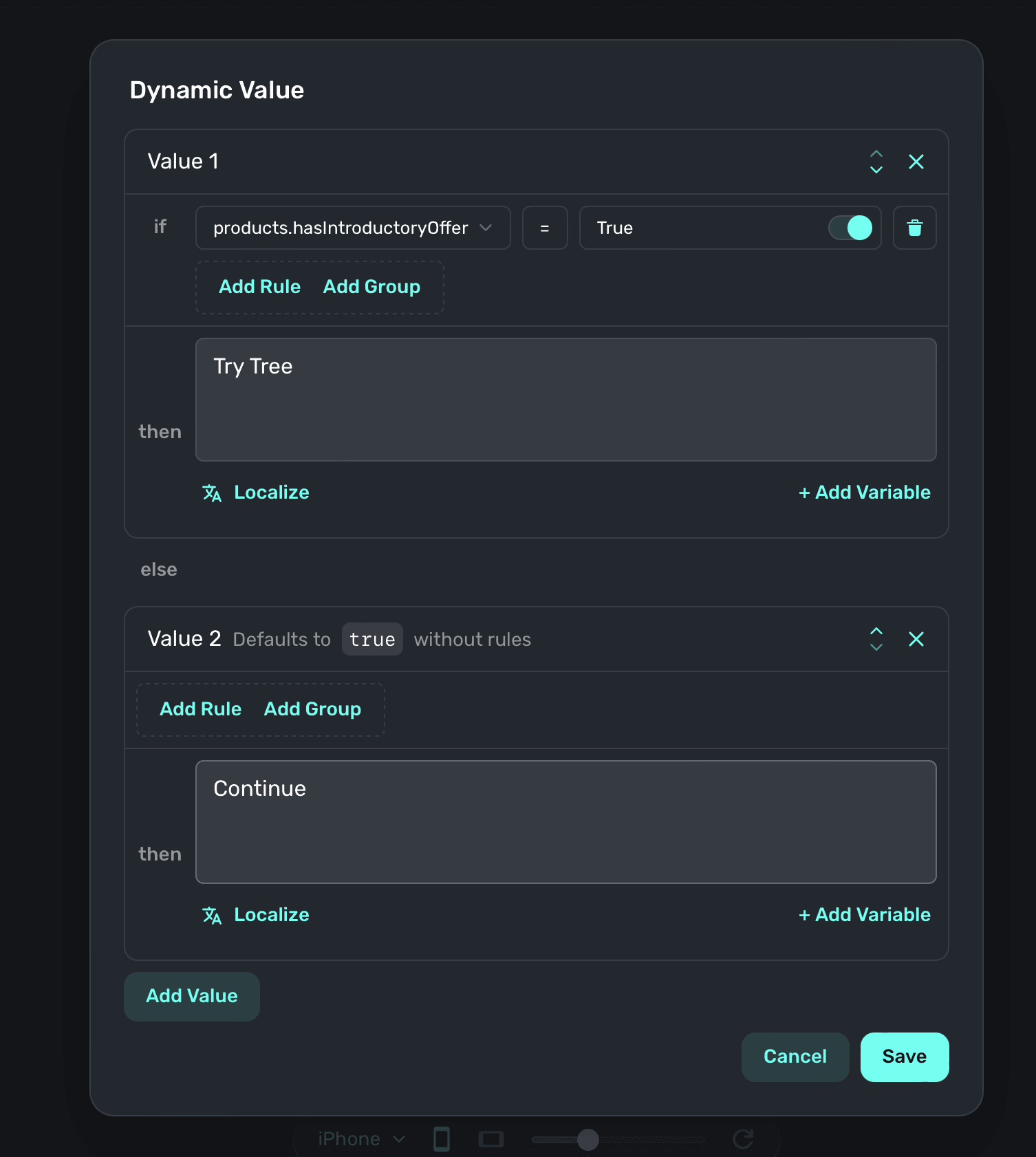
Write both versions of the paywall. A returning user sees the version without a trial, and its button should say "Subscribe", not "Start free trial".
To check both versions in the editor, click Variables in the sidebar and switch products.hasIntroductoryOffer between true and false.
Write trial copy with variables
Each product has variables for its trial, so your copy matches the store:
| Variable | Example |
|---|---|
products.selected.trialPeriodText | 7-days |
products.selected.trialPeriodDays | 7 |
products.selected.trialPeriodPrice | $0.00 |
products.selected.trialPeriodEndDate | May 2, 2024 |
products.selected.price | $39.99 |
For example:
Try {{ products.selected.trialPeriodDays }} days free, then {{ products.selected.price }}/{{ products.selected.period }}.Paid introductory offers, such as Pay as you go or Pay up front, use the same trial variables. For example, a first month at $3.99 is products.selected.trialPeriodPrice. For every product variable, see Variables.
Override eligibility (iOS)
On iOS, you can override Apple's eligibility per paywall: offer the trial to users who've already had one, as a win-back offer, or hide it from everyone. In the paywall editor, open Products and choose an option under Introductory Offer Eligibility:
- Automatic (Default): Apple decides.
- Always Eligible: Users can claim the offer even if they've had one before.
- Always Ineligible: No one sees the offer.
This needs iOS SDK 4.11.0 or later, iOS 16 or later, and both App Store Connect keys. See Overriding Introductory Offer Eligibility for the details, including purchase controller setup.
Remind users before the trial ends
A paywall can schedule a local notification that fires before the user's trial ends. Click Notifications in the paywall editor's sidebar, then + Add Notification, and set how many days before the end it fires. The user is asked to allow notifications after they start the trial. See Trial Reminder Notifications.
Target users in a trial
- To target users who started a trial and then turned off auto-renew, choose Active trials, auto-renew disabled when matching an audience to entitlements.
- To follow how trials convert, see the New Trials and Trial Conversion charts.
Testing trials
- On iOS, a sandbox account that has subscribed to anything in the group is no longer eligible. Reset its eligibility, following Apple's Testing introductory offers, or use a new sandbox account.
- If you reinstall the app during sandbox testing, the SDK may not know about earlier purchases until you restore. See Sandbox Free Trial Isn't Appearing.
- On TestFlight, subscriptions renew on an accelerated schedule, once a day. See TestFlight Subscriptions.
- In sandbox, a trial reminder notification fires after the set number of minutes instead of days.
If the trial doesn't show at all, see Why isn't my free trial showing up in my paywall?
Related
- Dynamic Values
- Products in the Paywall Editor
- Free Trials in the Superwall Framework, for paywalls written in code
How is this guide?
Paywall Preloading and Caching
Make Superwall paywalls open instantly. Learn how the SDK preloads paywalls at launch, how to prioritize or preload specific placements, and how Cache on Device keeps paywalls on the device.
Restoring Purchases
Let users restore App Store and Google Play purchases with Superwall: add a Restore button to a paywall, call restorePurchases() from your app, customize the failure alert, and restore with a purchase controller.